Overview
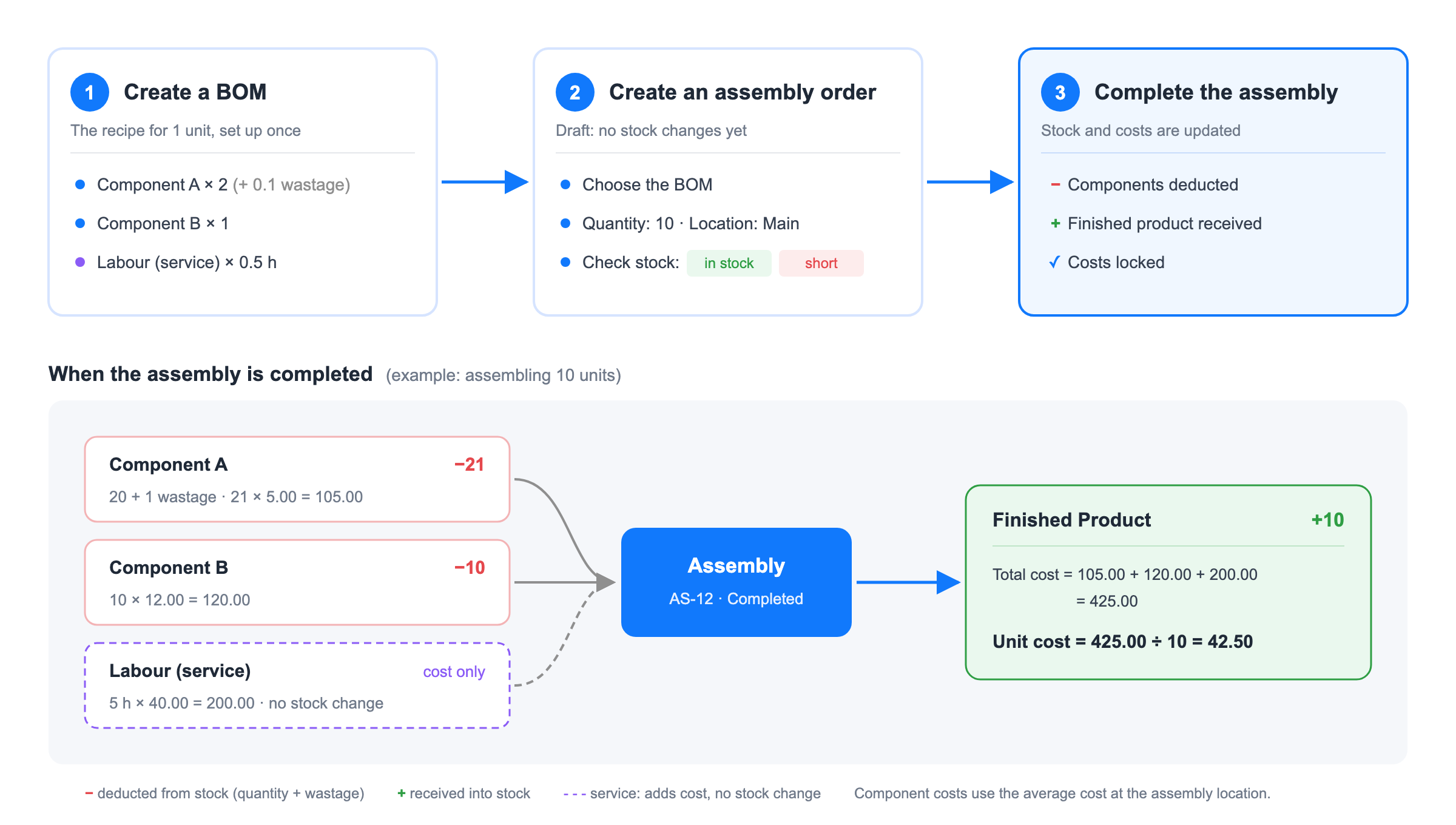
Assembly lets you build a new stocked product from other products. You define what goes into one finished unit once — this is called a BOM (Bill of Materials) — and then create assembly orders whenever you build. When an assembly is completed, StockUnify deducts the components from stock, adds the finished product to stock, and calculates the cost of the finished product for you.
Typical examples: building a PC from a case, a motherboard and a power supply; packing a gift hamper from several food items; or putting together a pump kit from a pump, hoses and fittings.
How assembly works
1. Create a BOM. A BOM belongs to the finished product and lists the materials needed to build one unit: component products (deducted from stock) and, optionally, services such as labour (their cost is added to the finished product, but they don't move stock). Each product can have one BOM.
2. Create an assembly order. Choose a BOM, enter how many units you want to build and the location where the assembly happens. StockUnify shows whether each component is in stock at that location. You can save the order as a draft and adjust the materials for this order if needed.
3. Complete the assembly. Select serial/batch numbers and bins if your products use them, confirm the cost and complete. The components stock is deducted, the finished product is received into stock, and the costs are locked.
Assembly, product package or product conversion?
StockUnify has three features that combine or change products. Use the table below to choose the right one.
Assembly | Product Package | Product Conversion | |
|---|---|---|---|
What it does | Builds a new physical product from several components | Sells several products together as one bundle | Turns one product into another (e.g. a box of 12 into 12 units) |
Does the result have its own stock? | Yes, the finished product is stocked | No, components are deducted when the package is sold | Yes |
Number of inputs | Many components, plus optional services (labour, overheads) | Many products | One product |
When stock moves | When you complete an assembly order | When the sales order is fulfilled | When you convert stock |
Best for | Kitting and light manufacturing done ahead of sales | Bundles and promotions | Breaking down bulk packs, repacking |
How the cost of an assembled product is calculated
The cost is calculated when the assembly is completed:
Each component uses its current average cost at the assembly location.
Wastage (extra material lost during the build) is included in the consumed quantity, so its cost is part of the finished product.
Service lines add their cost (quantity × unit cost) to the finished product.
Unit cost of the assembled product = (total component cost + total service cost) ÷ quantity assembled. You can override it before completing if needed.
Once an assembly is completed, its costs are locked and do not change.
Before you start
Permission: users need the "Manage bill of materials & assembly orders" permission. Admins have it automatically; for other users, enable it in Settings > Roles.
Xero tracked items cannot be used in assemblies, either as the finished product or as a component. Products that are tracked in Xero are not listed when you build a BOM or an assembly order.
The finished product and the components must be stocked products. Service products can only be added as service lines.